
Hookspot and webhook.site compared
Hookspot has 3 members on Free and 25 on Pro, where webhook.site's plans for several users start at $69 a month, and Hookspot keeps webhooks by days rather than by count. Choose webhook.site for an instant URL with no signup, or for its scripting and actions.
Free for 25,000 deliveries a month. No card needed.
| Hookspot | webhook.site | |
|---|---|---|
| Price | $0 on Free. Pro is a flat $19 a month, or $190 a year. | $0 for a URL with no account. Basic is $9 a month, Pro $27 and Enterprise $69, or $90, $270 and $699 a year. |
| Free plan | 25,000 deliveries a month. Past them, your projects lock until you upgrade or the month ends. | A URL that takes 50 requests and is deleted after 7 days. Its FAQ says 100 requests. |
| History kept | 14 days on Free, 60 days on Pro | The latest 1,000, 10,000 or 100,000 requests per URL by plan, for up to 365 days |
| Members | 3 on Free, 25 on Pro | Users and roles only on Enterprise, with 10 users included |
| How it reaches your app | hookspot listen forwards each delivery to the app on your laptop. | whcli forward forwards requests to your app. |
| While the CLI is off | Stores each webhook. Its delivery waits as Skipped until you start the CLI and click Retry. | Stores requests on the URL. whcli forward sends only new ones, and earlier ones by hand with --query. |
| Delivery to production | No. Hookspot delivers only to the app on your laptop. | On paid plans, through Custom Actions that forward each request to a URL. |
Checked 8 October 2026 against webhook.site's pricing page, frequently asked questions and CLI docs.
Several members on every plan
A Hookspot organization has 3 members on Free and 25 on Pro, so everyone building the integration sees the same sources, requests and deliveries. On webhook.site's pricing page, users and roles come only with Enterprise, at $69 a month with 10 users included.
For 3 people with their own logins to the same URLs, that's $0 on Hookspot Free against $69 a month on webhook.site Enterprise. Ten people, as many as Enterprise includes, pay $19 a month on Hookspot Pro.
Invite a memberHistory kept by days, not by count
Hookspot keeps each webhook for your plan's retention: 14 days on Free and 60 on Pro. A busy afternoon of test webhooks doesn't push out last week's.
On its pricing page, webhook.site keeps the latest 1,000 requests per URL on Basic, 10,000 on Pro and 100,000 on Enterprise. Its FAQ adds that paid data goes after 365 days at most. A free URL stops taking requests after 50, or 100 by the FAQ, and is deleted after 7 days.
Retention on each planOne source, several paths in your app
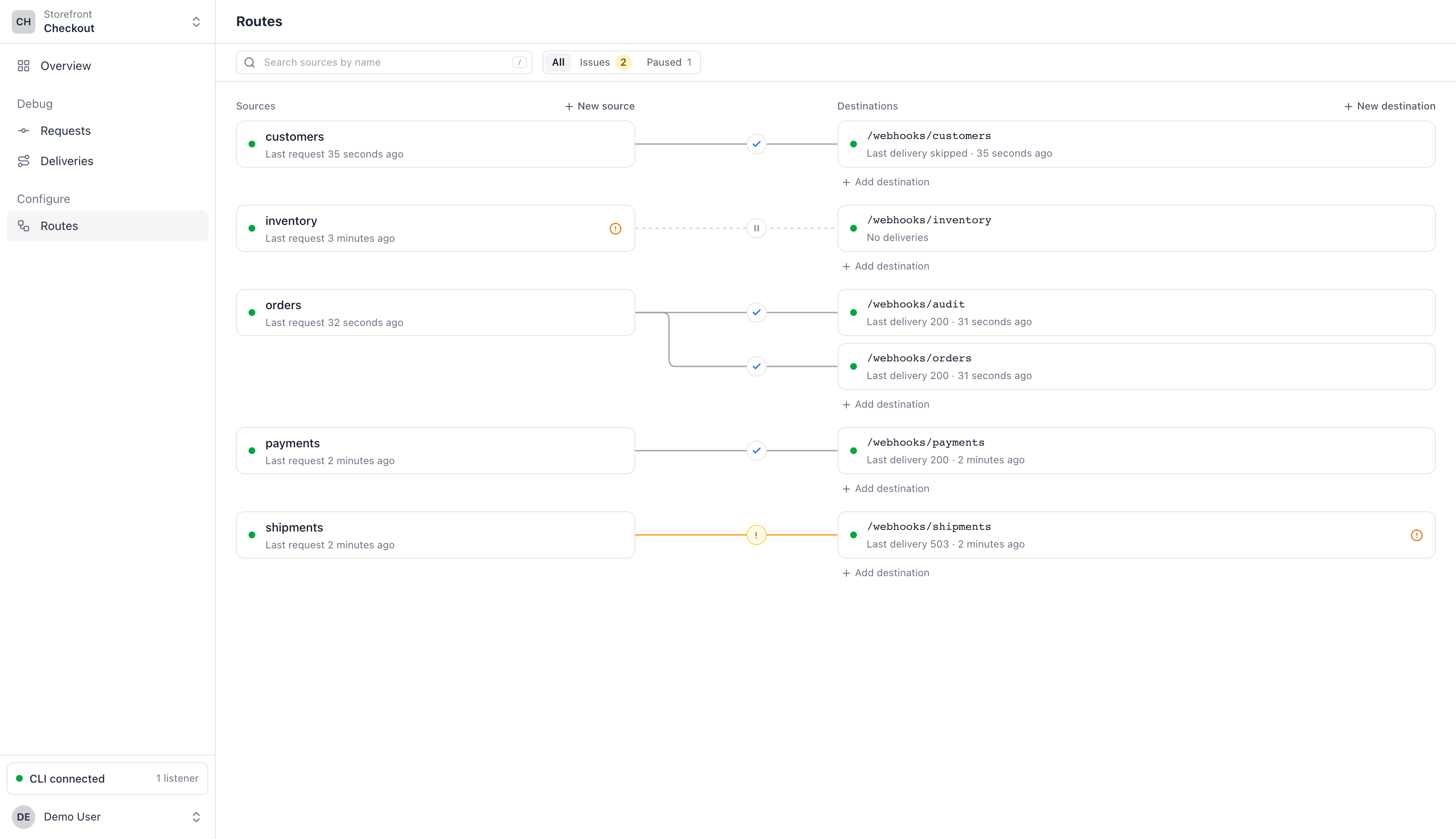
In Hookspot, a route connects a source's webhook URL to a path in your app. Give one source two routes, like /webhooks/orders and /webhooks/audit, and each webhook reaches both, with its own delivery and its own answer.
whcli forward sends what arrives at a URL to the one target URL you give it, as its CLI docs show.
What waits while the CLI is off
Both keep what arrives while you're away. webhook.site stores the requests on the URL, but whcli forward sends only those that arrive after it starts. To send earlier ones, you run it again with --query, as its CLI docs describe.
Hookspot marks each delivery Skipped. Start hookspot listen, then click Retry on a delivery, or Retry N skipped to send them all.
When to choose webhook.site
- You want a URL right now, with no signup. webhook.site gives you one when you open the page.
- You want to script what happens to each request. On paid plans, Custom Actions transform it, send emails and HTTP requests, and run scripts.
- The sender, the service that sends the webhook, needs your app's own answer, for example to confirm the URL.
whcli forwardcan pass it back, and Hookspot answers the sender itself. - You also want an email address that catches mail, or scheduled requests. webhook.site offers both beside its URLs.
Switching from webhook.site
Create a route
Sign up, then name a source and pick the path in your app, like
/webhooks/orders. Hookspot gives the source a webhook URL.Point the sender at the webhook URL
In the sender's webhook settings, replace your webhook.site URL with it.
Run
hookspot listenInstall the CLI and log in, then run it where you ran
whcli forward.
Follow the quickstartnpm install -g @hookspot/clihookspot loginhookspot listen --forward-to http://localhost:3000
Send your first webhook to your laptop.
Install the CLI with npm (Node.js 18 or newer) or Homebrew.
Hookdeck, webhook.site and smee.io belong to their owners; their facts come from their public pages, checked 8 October 2026.